
By a Senior Recruitment Strategist
In the competitive architecture of modern recruitment, the distance between a rejection email and an interview invitation is often measured in seconds. Recruiters at global technology giants Google, Amazon, Microsoft, and their peers do not read resumes in the traditional sense. They scan them. The industry consensus suggests a recruiter spends approximately six to ten seconds on an initial resume review. In that brief window, your document must convey competence, impact, and clarity.
This guide provides a comprehensive analysis of the “Harvard Resume Format,” a standard that has proven exceptionally effective for securing offers from the world’s most selective companies. We will explore the mechanics of this format, how to leverage artificial intelligence to optimize your content, and the specific psychological triggers that influence hiring managers.
Part I: The Philosophy of the Harvard Format
There is a common misconception among job seekers that a resume must be visually “stunning.” Candidates often waste hours designing colourful headers, adding photographs, or using multi-column layouts with skill bars and icons. This is a strategic error.
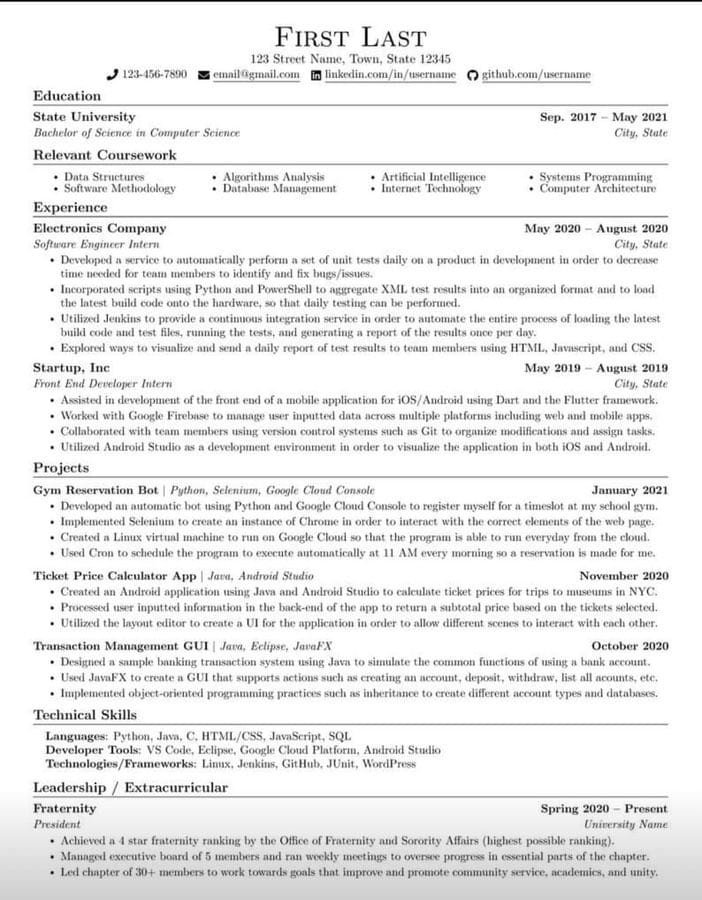
The Harvard format and the template provided in the resources associated with this guide is defined by its austerity. It is strictly text-based. It uses standard fonts. It avoids graphics entirely. This minimalism serves two critical functions:
- ATS Compliance: Most Global 2000 companies use Applicant Tracking Systems (ATS) to filter incoming applications. These systems parse text. Complex columns, graphics, and non-standard bullet points often break the parser, causing your resume to appear as garbled data. The Harvard format ensures 100% readability by these machines.
- Cognitive Ease for Recruiters: When a hiring manager reviews fifty resumes in an hour, they look for predictable patterns. They want to know exactly where to look for your education, your current role, and your skills. The Harvard format standardizes this information hierarchy, allowing the recruiter to focus purely on your achievements rather than deciphering your layout.
The Core Structure
The template is divided into specific headers. Understanding the logic behind each section is vital. You cannot simply fill in the blanks; you must engineer the content to fit the expectations of the role.
The standard hierarchy is as follows:
- Header: Name and Contact.
- Education: Academic background (placed at the top for students/recent grads, moved to the bottom for experienced professionals).
- Professional Experience: The core evidence of your value.
- Projects: Application of skills (crucial for technical roles).
- Skills & Interests: Hard technical skills and relevant certifications.
Part II: Deconstructing the Sections
1. The Header: Minimalism is Key
Your name should be the largest text on the page. Below it, provide only the essentials:
- Phone number.
- Email address (use a professional format, e.g., firstname.lastname@gmail.com).
- LinkedIn URL (customized, not the default string of numbers).
- GitHub/Portfolio URL (for technical or creative roles).
- City and Country (Full street addresses are obsolete and pose security risks).
What to Avoid: Do not include a photograph. In many Western markets (US, UK), resumes with photos are automatically discarded to avoid potential bias lawsuits. Do not include marital status, religion, or age.
2. Education: Precision and Placement
For students and recent graduates, this section sits at the top. For professionals with more than two years of experience, this moves below the experience section.
Format:
- Institution Name.
- Degree and Major.
- Graduation Date (Month/Year).
- Relevant Coursework: List only the courses relevant to the job you are applying for. If applying for a Machine Learning role, list “Algorithms” and “Data Structures,” not “History 101.”
3. Professional Experience: The Engine of the Resume
This is where the majority of candidates fail. Most resumes read like job descriptions. They list duties: “Responsible for managing the team,” or “Tasked with writing code.”
Recruiters do not care what you were supposed to do. They care about what you did and the result of that action.
The Google XYZ Formula Laszlo Bock, the former Senior VP of People Operations at Google, popularized a formula for resume bullet points that is now the industry standard.
- “Accomplished [X] as measured by [Y], by doing [Z].”
Example of a bad bullet point:
- “Wrote code for the new app update.”
Example using the XYZ Formula:
- “Reduced application load time by 20% (Y) and improved user retention (X) by refactoring the legacy codebase using React Native (Z).”
Every bullet point in your experience section must answer the question: “So what?” If you managed a team, did productivity increase? If you sold a product, how much revenue did you generate? If you optimized a process, how many hours were saved?
Action Verbs: Start every bullet point with a strong past-tense action verb. Avoid weak words like “Helped,” “Worked on,” or “Assisted.” Instead, use:
- Engineered, Spearheaded, Orchestrated, Developed, Negotiated, Optimized, Revitalized.
4. Projects: The Proof of Competence
For software developers, engineers, and data scientists, the ‘Projects’ section is often more important than education. This is where you demonstrate passion and capability.
List 2-3 significant projects. Follow the same XYZ structure as the experience section. Mention the specific technology stack used (e.g., Python, AWS, Docker). If the project is live, include a link.
5. Skills: Categorization
Do not list soft skills like “Hard worker” or “Good communicator.” These are demonstrated through your experience bullet points, not listed as keywords.
Group your hard skills logically:
- Languages: Java, Python, C++, SQL.
- Frameworks: React, Spring Boot, Django.
- Tools: Git, Docker, Kubernetes, Jenkins.
- Certifications: AWS Certified Solutions Architect, Google Professional Data Engineer.
Part III: Leveraging Artificial Intelligence
The provided WhatsApp context mentions using Artificial Intelligence to build this resume. This is a powerful strategy if used correctly. AI should be your editor, not your writer.
How to use ChatGPT or similar LLMs for your CV:
1. The Extraction Prompt Paste your current, messy resume into the AI and use this prompt:
“Act as a Senior Technical Recruiter at Google. Extract my work experience and rewrite my bullet points using the Laszlo Bock ‘XYZ’ formula (Accomplished X as measured by Y, by doing Z). Ensure the tone is professional, results-oriented, and uses strong action verbs. Output the result in plain text suitable for a Harvard resume template.”
2. The Keyword Optimization Prompt Paste the Job Description (JD) of the role you want, along with your resume draft:
“Compare my resume against this Job Description. Identify any critical keywords or skills missing from my resume that I likely possess based on my experience. Suggest specific edits to align my resume with this JD for ATS optimization.”
3. The Summary Refinement If you choose to include a professional summary (optional in the Harvard format, usually not recommended unless you are pivoting careers), ask the AI:
“Write a 3-sentence professional summary for a Senior Software Engineer with 5 years of experience in Fintech, focusing on cloud migration and distributed systems.”
Warning: Do not copy-paste AI output blindly. AI often uses generic adjectives like “visionary” or “seasoned.” Remove these. Keep the language grounded and factual.
Part IV: Execution and Final Review
You can access the structural base for this format via the link below.
Download the Harvard Resume Template Here
Instructions: Open the link and select File > Download > Microsoft Word (.docx) to edit the document on your local machine.
The Formatting Checklist:
- Font: Times New Roman, Arial, or Helvetica. Size 10.5 to 12 for body text. Size 14-16 for headers.
- Margins: Standard 0.5 to 1 inch on all sides.
- Length: One page.
- Note: There is a strict unwritten rule in US/Tech recruiting. If you have less than 10 years of experience, your resume must be one page. If you have 10+ years, two pages are acceptable. Never exceed two pages.
- Consistency: Ensure all dates are aligned to the right. Ensure all bullet points end with a period (or consistently do not).
The “Blink” Test Print your resume. Place it on a table. Walk past it. If you cannot identify your current role, your previous employer, and your top three skills in under three seconds, you need to simplify the formatting.
Last Words
The Harvard resume format is not a guarantee of a job, but it is a guarantee that you will be taken seriously. It removes the friction between your qualifications and the recruiter’s understanding. By combining this rigorous structure with AI-driven content optimization focusing on metrics, results, and action verbs you position yourself not just as a candidate, but as a high-value asset.
Download the template. Strip away the graphics. Focus on the data. This is how you build a resume that withstands the scrutiny of Google, Microsoft, and Amazon.